
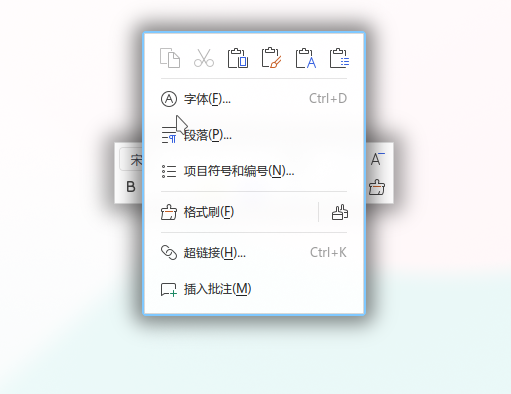
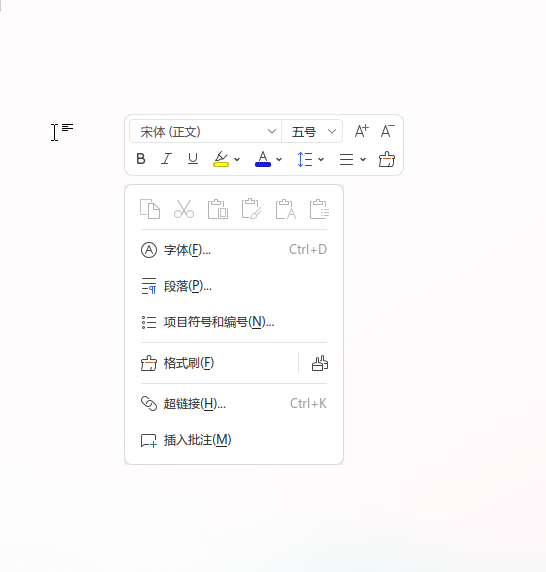
在 Wayland 桌面环境中(例如使用 Niri 等平铺窗口管理器),通过 xwayland-satellite 运行 X11 应用程序时,可能会遇到 WPS Office 的右键菜单被错误识别为普通顶级窗口的问题。这会导致右键菜单在弹出时被窗口管理器平铺,或者作为一个带边框的独立浮动窗口显示,严重破坏了正常的交互体验。
本文记录了该问题的成因以及在 xwayland-satellite 中对应的修复方案。
改动前
改动后
问题原因分析
通过抓取 WPS 右键菜单窗口的 X11 属性,可以发现该类窗口具备以下属性特征:
- 窗口类型 (
_NET_WM_WINDOW_TYPE): 包含_KDE_NET_WM_WINDOW_TYPE_OVERRIDE以及_NET_WM_WINDOW_TYPE_NORMAL。 - 窗口状态 (
_NET_WM_STATE): 包含_NET_WM_STATE_SKIP_TASKBAR,表明其不应在任务栏中展示。 - Motif 提示 (
_MOTIF_WM_HINTS): 配置为无边框和无窗口装饰(即motif_popup)。 - 窗口关联 (
WM_HINTS): 通过 transient_for 属性与主窗口进行关联。
在原有的 xwayland-satellite 启发式判定中,系统未对 _KDE_NET_WM_WINDOW_TYPE_OVERRIDE 这一窗口类型进行特别处理,因而会回退至 _NET_WM_WINDOW_TYPE_NORMAL 的判定逻辑。
对于 normal 类型的窗口,只有在满足 override_redirect 或特定的 wmhint_popup 启发式规则时,才会被识别为弹出窗口 (is_popup = true)。而 WPS 的右键菜单未能匹配这些旧规则,导致其被判定为了普通的平铺窗口。
解决方案
为了正确识别 WPS 右键菜单,需要在窗口类型判定中增加对 _KDE_NET_WM_WINDOW_TYPE_OVERRIDE 的显式支持。
1. 注册新的原子
首先在 src/xstate/mod.rs 的原子注册中,加入 _KDE_NET_WM_WINDOW_TYPE_OVERRIDE:
xcb::atoms_struct! {
    // ...
    utility => b"_NET_WM_WINDOW_TYPE_UTILITY" only_if_exists = false,
    tooltip => b"_NET_WM_WINDOW_TYPE_TOOLTIP" only_if_exists = false,
    combo => b"_NET_WM_WINDOW_TYPE_COMBO" only_if_exists = false,
    kde_override => b"_KDE_NET_WM_WINDOW_TYPE_OVERRIDE" only_if_exists = false,
}
2. 完善启发式判定规则
在遍历 window_types 时,如果检测到 _KDE_NET_WM_WINDOW_TYPE_OVERRIDE 类型,则应用如下规则: 当窗口被设置为 override_redirect,或者同时包含“跳过任务栏(skip_taskbar)”与“无边框装饰(motif_popup)”时,将其判定为弹出窗口(popup)。
具体实现代码如下:
impl XState {
    // ...
    let mut known_window_type = false;
    for ty in window_types {
        match ty {
            x if x == self.window_atoms.kde_override => {
                is_popup =
                    override_redirect || (has_skip_taskbar.unwrap_or(false) && motif_popup);
            }
            x if x == self.window_atoms.normal => is_popup = override_redirect || wmhint_popup,
            // ...
        }
    }}
测试验证
为了确保该逻辑的正确性并防止后续代码重构引入回归,在集成测试 tests/integration.rs 中添加了针对 WPS 右键菜单属性的测试用例:
#[test]
fn popup_heuristics() {
    // ...
    let wps_context_menu = connection.new_window(connection.root, 10, 10, 220, 281, false);
    connection.set_property(
        wps_context_menu,
        x::ATOM_ATOM,
        connection.atoms.win_type,
        &[
            connection.atoms.win_type_kde_override,
            connection.atoms.win_type_normal,
        ],
    );
    connection.set_property(
        wps_context_menu,
        x::ATOM_ATOM,
        connection.atoms.net_wm_state,
        &[connection.atoms.skip_taskbar],
    );
    connection.set_property(
        wps_context_menu,
        connection.atoms.motif_wm_hints,
        connection.atoms.motif_wm_hints,
        &[0x2_u32, 0x1, 0x0, 0x0, 0x0],
    );
    connection.set_property(
        wps_context_menu,
        connection.atoms.wm_hints,
        connection.atoms.wm_hints,
        &[0x41_u32, 1, 0, 0, 0, 0, 0, 0, win_toplevel.resource_id()],
    );
    f.map_as_popup(&mut connection, wps_context_menu);
    // ...
}
通过这一改动,WPS Office 在 Wayland 下的右键菜单现在能够被正确识别为弹出式窗口,不再会出现被误平铺或显示多余装饰边框的问题。
评论区